Home

EVSE information

  • EV Connector Types Explained: 2025 Field Guide EV Connector Types Explained: 2025 Field Guide
    Aug 11, 2025
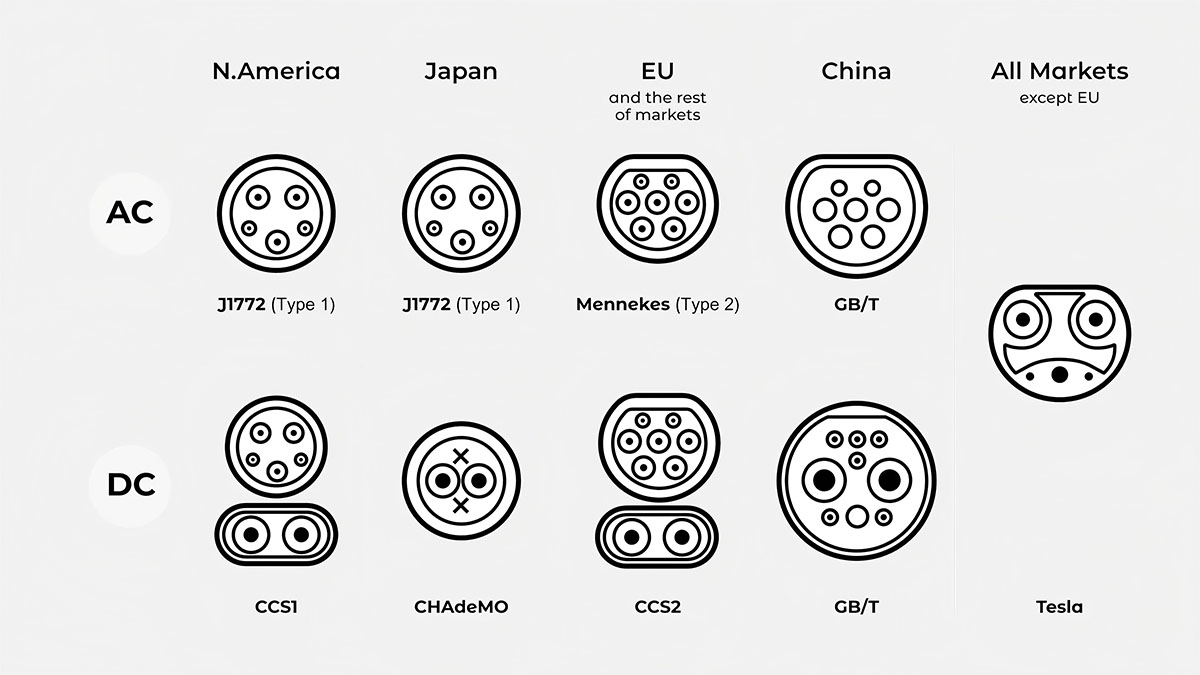
    Most buyers and project teams ask the same three things: which connector fits my region, what charging power to expect, and how this choice affects installation. This guide walks through the mainstream EV connectors — Type 1, Type 2, CCS1, CCS2, NACS, GB/T, and CHAdeMO — with clear differences, typical use cases, and selection tips you can apply right away.     Quick Reference: Connector, Region, Typical Use Connector AC or DC Typical field power Primary regions Common use Type 1 (SAE J1772) AC Up to ~7.4 kW, single phase North America, parts of Asia Home and workplace charging Type 2 (IEC 62196-2) AC Up to ~22 kW, three phase Europe and many other regions Public posts and residential wallboxes CCS1 DC Commonly 50–350 kW North America Highway and urban fast charging CCS2 DC Commonly 50–350 kW Europe and many other regions DC fast corridors and hubs NACS (SAE J3400) AC and DC in one port Home AC + high power DC Mainly North America, expanding One port vehicle inlet GB/T (AC and DC) Both, separate interfaces AC posts + high power DC Mainland China All scenarios in China CHAdeMO DC Often around 50 kW at legacy sites Japan and limited elsewhere Older DC sites and fleets       AC vs DC at a Glance (typical ranges) Mode Voltage path Who limits the power Typical use Level 1/2 AC Grid → onboard charger → battery Vehicle onboard charger Homes, workplaces, long stay parking DC fast charging Grid → rectifier at station → battery Vehicle battery/thermal limits and station design Highways, retail hubs, depots   Type 1 (SAE J1772) — AC charging Takeaway: Simple single-phase AC used widely across North America for homes and workplaces. What it is: A five pin AC connector. Real world setups often deliver up to about 7.4 kW depending on the circuit and the car’s onboard charger. Where it fits: Residential wallboxes, portable chargers, and many workplace posts. Ideal where cars stay parked for hours. Notes for projects: Confirm the onboard charger rating before promising charge times. For DC, most vehicles in this region use CCS1 on the same inlet.     Type 2 (IEC 62196-2) — AC charging Takeaway: Europe’s default AC connector, supporting single or three-phase; commonly up to ~22 kW on public posts. What it is: A seven-pin AC design that works with single or three-phase supply. The connector remains the same regardless of phase. Where it fits: Public posts, shared garages, residential wallboxes, and light fleet top ups. Notes for projects: Cable choices matter—conductor size, jacket rating, and length affect heat, handling, and overall user experience. In these regions, DC fast charging typically uses CCS2, which keeps the Type 2 outline but adds dedicated DC pins.     CCS (Combined Charging System) — CCS1 and CCS2 are the main DC fast-charging interfaces. A single inlet on the vehicle supports AC and DC: CCS1 aligns with the Type 1 geometry, CCS2 with Type 2. What it is: An AC shape combined with two DC pins. Field deployments commonly range from 50 to 350 kW. Higher power demands careful thermal management and cable selection. Where it fits: Highway corridors, retail hubs, and depots that need quick turnarounds. Notes for projects: A 350 kW dispenser does not guarantee a 350 kW session. Station capability, cable rating, ambient temperature, and the vehicle’s charging curve together define real outcomes. If high duty cycles are expected, consider liquid-cooled cable assemblies to reduce handle mass and keep temperatures in check.     NACS (SAE J3400) — one port for AC and DC Takeaway: Compact vehicle inlet that supports home AC and high-power DC in the same port. What it is: A slim, ergonomic design favored for cable handling and packaging. Ecosystem coverage is expanding. Where it fits: Homes, mixed-standard sites, and networks adding NACS alongside existing hardware. Notes for projects: In mixed markets, verify vehicle compatibility, adapter policies, payment flow, and software support. Plan cable reach and strain-relief to protect the user experience as traffic grows.     GB/T — China uses separate connectors for AC and for DC, each designed specifically for its job. What it is: AC serves homes, workplaces, and public posts; DC serves fast charging at service areas, city hubs, and logistics depots. Where it fits: All passenger and many commercial scenarios in mainland China. Notes for projects: Cross border travel requires adapter planning and awareness of local rules. For exports, vehicles often adopt alternate inlets to match destination markets.     CHAdeMO — an earlier DC standard that remains common in Japan and at a number of legacy sites elsewhere. What it is: A DC connector that many older vehicles rely on; many sites target around 50 kW sessions. Where it fits: Maintained networks in Japan, plus certain fleets and older installations in other regions. Notes for projects: Outside Japan, availability is more limited than CCS or newer alternatives. Route planning is important if relying on these sites.     Selection Guide: How to pick the right connector Region and compliance: Match the dominant regional standard first to cut adapters and support load. • Check certification and labeling requirements before procurement. Vehicle mix: List inlets across current and near term fleets. • Consider visitors/tenants—mixed sites may justify dual standard posts. Power target and dwell time: Long stay parking favors AC; quick turns and corridors favor DC. • Higher power increases cable mass and thermal demands—factor in ergonomics. Site conditions — choose enclosure and impact protection to match local risks: temperature swings, dust or rain, and physical knocks. Use appropriate IP and IK ratings. • Use cable management to reduce wear, trips, and drops. Operations and software: Payment and authentication must match user expectations. • OCPP integration and remote diagnostics reduce truck rolls. Future-proofing: Size conduits and switchgear for later power increases. • Reserve space for liquid-cooled cables or additional dispensers if high power is on the roadmap. Compatibility and Safety Checks: Adapters: Use certified units and follow local rules. Adapters do not increase charging speed. • Cables: Match connector rating, cable gauge, cooling method, and sealing to duty cycle and climate. • Inspection: Look for debris, bent pins, and worn seals; these are common causes of failed sessions. • Handling: Train staff on safe connection, emergency stops, and periodic cleaning.     Operator Playbooks (expandable) Hardware layout: Consider dual-standard posts or swappable leads to serve CCS and NACS during transition periods. • Software flow: Ensure payment, authentication, and session data work consistently across connector families. • Cable ergonomics: Plan reach and strain-relief so a single bay serves varied inlet positions without stressing connectors. ChaoJi aims to increase power delivery with a new mechanical and electrical interface. Where relevant, watch for compatibility pathways from existing standards. • V2X (vehicle-to-everything) depends on connector, protocol, and policy support. If bidirectional use is on your roadmap, confirm requirements early in design. Use-Case Snapshots: Home and small business: AC wallboxes; prioritize cable length, tidy mounting, and a clear display. • Workplaces and destinations: Mix of AC for long stays and a limited number of DC posts for quick turns. • Highways and depots: DC first; design for queueing, cable reach, and quick recovery from connector damage. Mini Glossary: AC charging: Power is rectified inside the vehicle by the onboard charger. • DC fast charging: Power is rectified at the station and delivered directly to the battery. • Vehicle inlet vs plug: The inlet is on the car; the plug is on the cable or dispenser. • Single vs three-phase: Three phase enables higher AC power at suitable sites. • Liquid-cooled cable: A high-power DC cable with coolant channels that reduce handle mass and heat.     FAQ Is Type 2 the same as CCS2? No. Type 2 is an AC connector. CCS2 builds on the Type 2 geometry, integrating extra DC contacts for high-rate charging.   Can NACS and CCS coexist on the same site? Yes. Many operators deploy mixed hardware or support adapters where permitted. Confirm policies and software support.   How fast is AC compared with DC? AC power is limited by the onboard charger in the car, so it suits long dwell times. DC bypasses the onboard charger and usually delivers much higher power for short stops.   Do adapters change my maximum charging speed? No. The vehicle, cable rating, and station design set the ceiling. Adapters mainly provide physical compatibility.   What should I check before choosing cables and connectors? Confirm target power, duty cycle, ambient conditions, and handling needs. Match connector rating, cable gauge, cooling method, and sealing accordingly.     Explore connectors by standard: • Type 1 AC plug & cable• Type 2 AC charging cable• CCS1 DC plug (200A)• CCS2 DC plug (Gen 1.1, 375A natural-cooled)• Liquid-cooled CCS2 solutions• NACS connector• GB/T AC connector• GB/T DC connector• EV connector category overview Related testing & engineering reads: • Liquid-cooled EV charging technology• Salt-spray & durability testing
    Read More
  • How to Start an Electric Vehicle Charging Business in 2025: Step-by-Step Guide How to Start an Electric Vehicle Charging Business in 2025: Step-by-Step Guide
    Feb 23, 2023
    As electric vehicles become increasingly mainstream, the demand for convenient, fast, and reliable charging infrastructure is skyrocketing. For entrepreneurs and investors, 2025 presents an unprecedented opportunity to enter the booming EV charging market. However, success requires more than just installing chargers — it calls for a strategic approach covering market analysis, choosing the right business model, partnering with quality suppliers, and effective execution.   In this article, we break down the process into six essential steps to help you confidently start your own EV charging business and position yourself for growth in this fast-evolving industry.   Step 1: Understand Why 2025 Is the Perfect Time to Enter the Market   The electric vehicle (EV) industry is accelerating faster than ever. With global EV sales reaching new heights in 2024 and projections showing continued rapid growth into 2025, the demand for charging infrastructure has never been greater. As more consumers switch to electric, the need for reliable and accessible charging solutions is skyrocketing, creating a lucrative opportunity for businesses ready to meet this surge in demand. In 2024, global EV sales reached approximately 17.1 million units, a year-on-year increase of over 25%. Experts forecast that by 2025, EVs could make up more than 25% of all new car sales worldwide. China leads this surge, accounting for over half of global EV sales, while markets in Asia, Latin America, and Africa are rapidly catching up.     Despite some slowdown in Europe and North America, the demand for EVs is growing worldwide, creating an urgent need for expanded charging infrastructure. The number of public charging points worldwide surpassed 5 million in 2024, growing by 30% from the previous year, but the supply still lags behind demand. For instance, in China, there is roughly one public charger for every 10 EVs, whereas in the U.S., the ratio is about one charger for every 20 vehicles — highlighting significant opportunities for expansion.     Government policies and investment incentives also accelerate the market. The U.S. plans to increase public chargers from 400,000 to 3.5 million by 2030, and Europe enforces strict regulations requiring fast chargers every 60 km on highways. Globally, the EV charging station market size was valued at nearly $40 billion in 2024, with a projected compound annual growth rate (CAGR) of 24% over the next decade.       Step 2: Choose Your Market Segment and Business Model Public Fast Charging Stations Fast chargers (150 kW and above) located along highways, city centers, and shopping malls serve high-traffic users. These stations generate strong revenues but require significant upfront investment and careful site selection. Residential and Workplace Charging Partnering with property developers, office buildings, and fleets to install slower chargers in parking lots can ensure stable, recurring usage. This segment requires less capital but can build long-term customer loyalty Portable and Home Charging Devices Providing portable EV chargers and home charging equipment taps into the growing EV owner market that values convenience and flexible charging options.     Step 3: Design a Revenue and Partnership Strategy Pay-per-use Charging:Users pay per kWh consumed plus any service fees. Subscription or Membership Models:Offer monthly plans with unlimited or discounted charging. Value-Added Services:Include advertising, retail partnerships, vehicle maintenance, or loyalty programs. Technology platforms enabling app-based charging, smart billing, and real-time monitoring are critical for smooth operation. Collaborations with property owners, energy providers, and vehicle manufacturers can unlock subsidies, site access, and customer channels.   Step 4: Select Reliable Suppliers and Partners When choosing your hardware and service suppliers, focus on: Certifications and Quality Assurance:UL, CE certifications and rigorous in-house and third-party testing. Local Service and Support: Regional service teams for timely maintenance and customer care. Production Capacity and Reliability: Stable manufacturing and delivery schedules. R&D and Innovation: Ability to provide fast-charging, smart connectivity, and software upgrades. Proven Track Record: References from existing customers and solid reputation.     Step 5: Estimate Costs and Financing Options Item Estimated Cost (USD) 150 kW DC Fast Charger + Installation $50,000 - $100,000 Civil Works (cabling, site prep) $20,000 - $50,000 Software & Network Integration $5,000 - $15,000 Operations & Maintenance (monthly) $5,000 - $10,000   Initial investment for a single fast-charging site typically ranges between $100,000 and $200,000. Operational expenses include electricity, maintenance, rental fees, and platform services. Depending on utilization rates, many stations recover costs within 2-4 years.   Government grants, subsidies, and public-private partnerships (PPP) are valuable avenues to reduce upfront costs and accelerate deployment.      Step 6: Implementation Roadmap Market Research: Identify target cities or regions with growing EV penetration and insufficient charging infrastructure. Site Selection: Analyze potential locations based on traffic flow, accessibility, and competitor density. Engage Stakeholders: Secure agreements with property owners, utilities, local governments, and other partners. Vendor Selection: Evaluate multiple suppliers for equipment quality, price, and support. Installation and Testing: Complete construction and system integration with a pilot testing phase. Launch and Marketing:Introduce your charging service through EV apps, loyalty programs, and local promotions. Scale Up:Use operational data to optimize pricing, expand locations, and improve customer experience.      Why Start Your EV Charging Business Now? The industry is entering a critical growth phase driven by: Rising EV adoption worldwide pushing demand for fast, reliable charging. Infrastructure gaps in many global markets that still lack sufficient charging points. Government incentives and policies lowering investment risk. Growing consumer preference for convenient and smart charging solutions.     Starting an EV charging business in 2025 positions you to capture a rapidly expanding market. By carefully selecting locations, partnering with reliable suppliers, and designing customer-centric offerings, you can build a sustainable and profitable enterprise.   If you’d like more detailed advice tailored to your region or budget, feel free to reach out!        
    Read More
  • Plug Fits but Not Charging (2026): EV Charging Session Failures and Fixes Plug Fits but Not Charging (2026): EV Charging Session Failures and Fixes
    Jul 22, 2025
    A connector can fit and lock, yet charging still fails. In many cases, the issue is not the connector shape. It happens during the charging session: safety checks, communication setup, authorization, or power negotiation.   Here, compatibility means the full path from plug-in to stable energy delivery. The connector standard can match, and the session can still fail to start, stop early, or run at unexpectedly low power.       Checks to do before you change anything 1. Re-seat the connectorUnplug, then plug in again firmly until it is fully seated and latched. Keep the cable straight and avoid side pull.   2. Remove strain on the handleIf the cable weight twists the handle, support the cable or reposition slightly so the connector sits straight.   3. Inspect the connector tipLook for water, dirt, or visible damage. If it is wet or dirty, stop and try a different stall or connector.   4. Try a different stallIf another stall works, the issue is likely tied to the first stall or its connector.   5. Read the station messageNote the exact wording or code. It usually points to payment, communication, safety checks, or temperature protection.   If the session starts and stops more than once on the same stall, switch stalls or switch sites instead of repeating the same attempt.     Symptom to cause map What you see on site Most likely category What to do next “Authorization failed”, “Payment required”, app/RFID step not accepted Authorization and backend approval Confirm the app/RFID/payment step completed, retry once, then switch stall or site “Communication error”, “Handshake failed”, repeated start attempts without charging Communication setup and protocol behavior Re-seat, switch stall, then switch site and report the stall ID + error Plug locks, then stops within 1–3 minutes Contact instability or a protection trigger Remove strain, keep the tip dry, switch stall, avoid repeated retries Charging starts but power is far lower than expected Station limit, battery conditions, negotiated cap, thermal derating Try another stall, compare behavior, check battery state/temperature Works at one site but fails at another Operator rules, firmware differences, backend differences Use a different operator/site, capture error code + time + stall ID Connector locks but won’t release Lock routine or latch friction End the session, unlock the vehicle, then follow the station/vehicle release steps. Do not force the handle     Where failures happen in the charging sequence Charging sequenceConnect and latch→ Safety checks (grounding, insulation, temperature sensors)→ Communication setup (vehicle and station align on protocol and limits)→ Authorization (account/payment, session approval)→ Power negotiation (voltage/current limits, ramp)→ Energy delivery (monitoring and protection)→ Controlled stop and release         Common causes and what typically triggers them 1. Contact instability under cable loadA connector can be inserted but still sit under side load. Small contact resistance can rise under current, which may trigger protective stops or early derating.   Common on-site triggers ·Cable weight pulls the handle down or sideways ·The latch did not fully engage ·There is dirt, moisture, or wear at the contact surfaces   2. Communication setup problemsBefore power flows, the vehicle and station need a stable communication sequence and an agreed set of limits. Differences in implementation can cause a failed start or repeated handshake attempts.   Common on-site triggers ·The station shows a communication or handshake error ·Charging works on one stall but not another at the same site ·It works at one operator but fails at another with the same vehicle   3. Authorization and session approvalA session can be refused even when the hardware connection is solid. The cause can be account state, payment flow, roaming rules, or operator policy.   Common on-site triggers ·The station asks for a step that the app did not complete ·RFID is read, but the session is rejected ·Another site starts normally shortly after   4. Electrical envelope overlapCharging requires overlap between what the station can output and what the vehicle requests. When the overlap is limited, the session can fail during negotiation or run at reduced power.   Common on-site triggers ·The station stays in a negotiating state and then stops ·One hardware generation gives low power while another is normal ·The result changes with battery temperature and state of charge   5. Thermal protection and deratingStations and vehicles reduce current or stop to protect hardware when temperature rises too quickly. This can show up as slow charging, repeated stops, or sensitivity to weather.   Common on-site triggers ·Ambient temperature is high ·The connector is under strain or not fully seated ·Repeated retries are done on the same warm connector     What you can do, and what belongs to the site operator Some actions are in the driver’s control. Others require the site operator or installer.   For drivers Re-seat fully and remove side load Switch stalls early instead of repeating the same attempt Keep the connector dry and off the ground If power drops, try another stall and compare behavior Record the exact message/code, stall ID, time, and conditions   For site operators Inspect and clean contacts; check latch engagement and cable condition Validate grounding and insulation checks Review logs for handshake failures, authorization failures, and thermal events Update station firmware where applicable Improve on-screen guidance so users can separate payment issues from communication or safety stops   For manufacturers and integrators Validate contact stability under real cable load and repeated mating cycles Confirm thermal margins at sustained duty Test interoperability across common vehicle stacks and operator backends Provide actionable error codes and consistent fallback behavior   When to stop and switch approach Stop and switch stalls or switch sites if any of the following happens: The session starts and stops twice on the same stall The connector becomes hot to the touch You notice a burnt smell or visible discoloration The station repeatedly cycles through start attempts without charging   What to record when you report the issue Site name/location and time Stall ID and connector type Vehicle model/year and battery state Exact station message or code (a photo is best) Weather (heat, cold, rain) and whether the cable was under strain Whether another stall worked     FAQ Why does it work at one site but fail at another?Operators can differ in station firmware, backend authorization rules, and protection thresholds. Battery conditions can also change the negotiated result.   The plug fits and locks. Doesn’t that mean it should charge?Fit and lock confirm the mechanical interface. A charging session still depends on safety checks, communication, and authorization.   Is this an adapter problem?If the connector standard matches, swapping adapters usually does not help. Focus on seating, strain, station behavior, and the stage where it fails.   What should I send to the operator or installer?Share the stall ID, time, connector type, the exact error message/code, and whether another stall worked. Add weather and battery state if you can.     Workersbee note For fleets and CPO projects, stable interfaces reduce avoidable session failures. Workersbee supplies EV charging connectors and cable assemblies designed for repeatable mating, secure locking, and consistent contact performance across cycles. We also support connector selection and validation around your target use case, duty cycle, and environment.
    Read More
  • Europe's EV Charging Market in 2025: Trends, Insights, and Opportunities Europe's EV Charging Market in 2025: Trends, Insights, and Opportunities
    Jul 21, 2025
    As the adoption of electric vehicles continues to grow across Europe, charging infrastructure is under more pressure to keep up. By 2025, it’s clear that EV charging is no longer just a convenience—it’s a key part of energy strategy, real estate planning, and public service design.   At Workersbee, we work closely with businesses, fleets, and infrastructure operators to develop EV charging systems that are both scalable and future-ready. This article shares practical insights into where the European market is heading and what B2B customers should consider next.   1. Regulations Are Raising the Bar In 2025, two major EU policies are reshaping how charging infrastructure is planned and deployed: AFIR (Alternative Fuels Infrastructure Regulation) is setting firm requirements for fast charger availability along the main highway network. For example, by the end of 2025, charging pools must deliver at least 400 kW of total output. EPBD (Energy Performance of Buildings Directive) introduces new rules for commercial properties, requiring pre-installed cabling in new or renovated buildings. This applies to offices, retail centers, and apartment buildings. What this means: If your business is involved in real estate, parking, or fleet management, preparing now can reduce costs later and help ensure compliance with evolving standards.   2. Demand for Fast Charging Is on the Rise EV drivers increasingly expect shorter charging times, especially when they’re on the go. From 2020 to 2024, Europe saw a significant expansion in its public charging network, with total charger installations increasing by more than threefold. Alongside this growth, the proportion of fast-charging units—those offering more than 22 kW—has gradually become a larger part of the network.   Some key developments: Average charging speed across Europe now sits at 42 kW Chargers delivering over 150 kW now account for close to one-tenth of the entire public charging infrastructure across Europe. Countries like Denmark, Bulgaria, and Lithuania are seeing strong growth in fast DC installations What this means: If you operate in a location with high vehicle traffic—such as retail sites, rest stops, or logistics hubs—offering fast charging can directly boost usage and customer satisfaction.   3. Country-Level Highlights: Comparing Key Markets Here’s a simple overview comparing EV charging progress across selected countries in 2025: Country Chargers per 1,000 People Avg. Speed BEVs per 1,000 People DC Rollout Trend Netherlands 10.0 18.4 kW 32.6 Slowing down, mostly AC Norway 5.4 79.5 kW 148.1 Highly mature Germany 1.9 43.9 kW 24.1 Fast growth in HPC Italy 1.0 33.9 kW 5.1 Developing market France 2.3 33.2 kW 20.2 Needs faster options Spain 0.9 31.0 kW 4.4 Picking up pace Data compiled from publicly available sources, interpreted by Workersbee   4. User Behavior Is Evolving Recent surveys of EV owners across Europe reveal a few consistent patterns: Home charging remains the most common method, but nearly 1 in 3 charging sessions still happen in public. Price and convenience are the two main factors influencing public charging decisions. 70% of long-distance EV drivers plan their charging stops in advance, often choosing locations with amenities. What this means: Well-placed public charging stations—especially those offering food, rest areas, or shopping—can create value beyond just energy sales.   5. Power Grid Constraints Are a Real Challenge Installing high-speed chargers is not only about the hardware—it also depends on available grid capacity. In some regions, grid upgrades can take years and come with high costs.   To reduce these risks, B2B operators are exploring: Battery storage to smooth peak demand Energy management systems (EMS) for load balancing Modular hardware that supports phased expansion At Workersbee, we provide charging solutions designed to work efficiently even in power-constrained locations, helping businesses avoid unnecessary upgrades and delays.   Why Choose Workersbee as Your EV Charging Partner? We offer a full line of charging solutions tailored for commercial and industrial applications: Smart AC and DC chargers (7 kW to 350 kW) Compatible with Type 1, Type 2, CCS1, CCS2, NACS connectors Load balancing, peak shaving, and energy monitoring Ready for future features like V2G (vehicle-to-grid)   We believe EV charging should be simple, reliable, and scalable. Whether you’re installing your first station or managing multiple sites, we’re here to help you every step of the way.   Let’s Plan Your EV Charging Project If you’re planning to expand your charging network, launch a new location, or just need help understanding what hardware fits your goals, our team is ready to support you.   Get in touch with us for expert advice and product recommendations tailored to your region and business type.
    Read More
  • EV Charging Adapter Guide 2026: CCS1, CCS2, NACS, Type 1, Type 2, and GB/T EV Charging Adapter Guide 2026: CCS1, CCS2, NACS, Type 1, Type 2, and GB/T
    Jul 15, 2025
    EV charging adapters solve one clear mismatch: the connector on the charger does not match the inlet on the vehicle. They are not for extra reach, and they are not a fix for “it plugs in but won’t charge.” If the connector already matches and charging still fails, the cause is usually authentication, station faults, vehicle settings, communication, or a protection trip.     What an EV charging adapter is An EV charging adapter connects two different connector standards so they can mate safely within defined limits. In many AC cases, that can be a passive conversion adapter that preserves grounding/earthing continuity and correct control signaling. In DC cross-standard projects, the situation can be more demanding. Depending on the pairing and the environment, compatibility may require system-level validation and, in some cases, a dedicated conversion solution rather than a simple “shape adapter.”   An adapter is not an extension cable. It cannot add DC fast charging to an AC-only vehicle. It also cannot bypass site or vehicle restrictions. Even when two ends fit mechanically, a session may fail due to system expectations or allowed-use constraints, especially in DC fast charging environments.     AC adapters and DC adapters AC charging and DC fast charging place very different demands on an adapter.   With AC charging, the vehicle’s on-board charger converts AC to DC inside the car. The adapter must handle continuous current safely and keep pilot/proximity signaling stable.   With DC fast charging, the station sends high-current DC directly to the vehicle. Heat, contact stability, and locking/release behavior become much more important. For DC cross-standard deployments, treat the adapter as part of the power path and plan validation accordingly.     Before you buy: three checks that decide compatibility First, confirm whether you are charging on AC or DC. This determines the risk level and what matters in selection.   Second, write down both ends as a pair: vehicle inlet → charger connector. Shopping by a single connector name leads to avoidable mistakes.   Third, confirm whether the adapter is allowed and supported in your environment. For DC, the “allowed use” question can be as real as ratings. Check vehicle-side expectations and site-side rules early, before procurement.     Types of EV charging adapters Type 1 ↔ Type 2 (AC) This is common in mixed sites and cross-region travel when a Type 1 vehicle needs to use Type 2 AC infrastructure. In day-to-day use, continuous current handling, stable signaling, and mechanical strain relief decide reliability more than connector names.   Type 2 ↔ Type 1 (AC) This shows up in imported-vehicle scenarios and mixed sites with Type 1 infrastructure. Consistent behavior across different EVSE brands matters. Outdoor handling adds another layer: sealing, materials, and a body design that stays stable when exposed to water, dust, and temperature swings.   NACS ↔ Type 1 (AC) For AC use during a transition period, the practical success factors are still the basics: stable fit, steady current handling, and consistent control signaling. Most real failures in the field come from poor mechanical fit or underrated components rather than “mystery incompatibility.”   CCS1 ↔ CCS2 (DC) This is used for cross-region fleets, validation programs, and deployments with mixed DC infrastructure. Choose by voltage class and sustained current for the real duty cycle you expect, not by a headline number. Locking/release behavior matters because many support issues start with disconnect or latch problems, not with charging speed.       NACS ↔ CCS (DC) This has become a major category in North America. The key point is that DC access can be constrained by more than the physical interface. Vehicle-side requirements and site rules may determine whether charging is possible. If your goal is reliable DC access at scale, verify compatibility expectations and allowed use early, then move to thermal and mechanical selection.   CCS2 → GB/T (DC) This pairing appears in project-driven deployments where CCS2-side systems need to interface with GB/T-centric environments. Treat it as a system-level topic, not just a connector topic. The practical requirement is end-to-end validation with the target vehicle and charging equipment, because DC cross-standard behavior may depend on more than mechanical fit. Plan engineering verification before rollout, especially for sustained operation and predictable connect/disconnect workflows.   CHAdeMO-related bridging (DC) People ask about this because CHAdeMO still exists in some regions and older fleets. In practice, this category is constrained. It is often not a simple passive adapter purchase decision, and availability can be limited. If a project depends on a CHAdeMO bridging path, validate end-to-end behavior in the real charging environment before committing.     Adapter comparison table Adapter type Charging mode Best fit Key checks Type 1 ↔ Type 2 AC Travel, mixed AC sites Continuous current handling, stable signaling, strain relief Type 2 ↔ Type 1 AC Imported vehicles, mixed sites EVSE compatibility, sealing, stable fit NACS ↔ Type 1 AC Transitional North America AC Fit quality, steady current handling, consistent signaling CCS1 ↔ CCS2 DC Cross-region DC operation Voltage class, sustained current, heat performance, locking behavior NACS ↔ CCS DC North America DC access Allowed-use constraints, vehicle/site expectations, heat performance CCS2 → GB/T DC Project deployments End-to-end validation, sustained operation behavior, workflow fi CHAdeMO bridging DC Legacy fleets only System validation, availability constraints, environment fit     How to choose an adapter Start with charging mode, then confirm rules and expectations, then confirm ratings. This order prevents most mistakes.   Selection flow:Identify AC or DC→ Confirm vehicle inlet standard→ Confirm charger connector standard at the site→ Confirm allowed use and compatibility expectations (especially DC)→ Match voltage class and sustained current needs→ Confirm thermal stability, locking/release behavior, and durability→ Deploy with clear labeling and simple user instructions     Two short scenarios Scenario 1: A Type 1 vehicle at a site with Type 2 AC socketsThe adapter solves the physical mismatch, but reliability depends on sustained current handling and stable signaling. If the interface runs warm or becomes intermittent, common root causes are underrated components or mechanical strain from a heavy cable. The practical fix is choosing an adapter designed for daily continuous use and reducing side-load at the interface.   Scenario 2: A fleet moving between CCS1 and CCS2 DC sitesThe common failure pattern is selecting by connector names without checking sustained operation and heat behavior. A setup that works for short sessions can struggle in hot weather or longer sessions. Standardize a small set, validate under real duty cycles, and train drivers to end sessions properly before disconnecting.     Checks before deployment Ratings that match real useContinuous and sustained use matters more than peak. AC charging can run for hours. DC puts sharp heat load into the interface.   Thermal behavior and contact stabilityHeat is often the first sign of trouble. Avoid stacking adapters, because each interface adds resistance, heat, and mechanical stress.   Locking and release behaviorA good adapter feels consistent and does not require unusual force. For DC, predictable locking and safe release behavior matter most.   Durability and environment fitOutdoor handling introduces water, dust, grit, and temperature swings. Choose hardware that survives poor conditions, not only ideal conditions.   Labeling and handlingAdapters move between vehicles and sites. Clear labeling reduces misuse. For fleets, a short instruction card prevents avoidable downtime.     Common mistakes Using an adapter to solve reach. That is a cable or site design problem, not a conversion problem. Stacking adapters. This increases resistance, heat, and mechanical stress. Assuming “DC is DC.” Ecosystem expectations and allowed use can block sessions. Shopping by connector names only. Sustained current and thermal margins decide real reliability.     Workersbee EV charging adapters Workersbee offers a focused set of conversion adapters for common cross-standard needs: Type 1 to Type 2 and Type2 to Type1 for AC charging, and CCS1 to CCS2, CCS2 to CCS1 for DC project scenarios. These products are intended for connector mismatch cases where the vehicle inlet and the charger plug follow different standards and need a stable interface.   For cross-standard projects, we support customers in confirming the correct pairing and application boundaries early, so the selected adapter matches the charging mode (AC vs DC), the duty cycle, and the deployment environment. This helps reduce mismatch risk in mixed fleets and cross-region rollouts, and makes it easier to standardize a practical adapter set across sites.     FAQs Can an adapter add DC fast charging to my car?No. If the vehicle does not support DC fast charging, an adapter cannot add that capability.   Can I stack adapters?Avoid it. Each interface adds resistance and heat, and stacking increases mechanical stress and failure points.   Why does a station reject an adapter even though it fits?Physical fit is only one layer. For DC environments, ecosystem expectations and allowed use can block sessions.   Do I need different adapters for home and public charging?Often, yes. Home is usually AC. Public can be AC or DC depending on the site. Start with charging mode.
    Read More
  • Why Workersbee's EV Charging Connectors Use Temperature Sensors for Safer Charging Why Workersbee's EV Charging Connectors Use Temperature Sensors for Safer Charging
    May 06, 2025
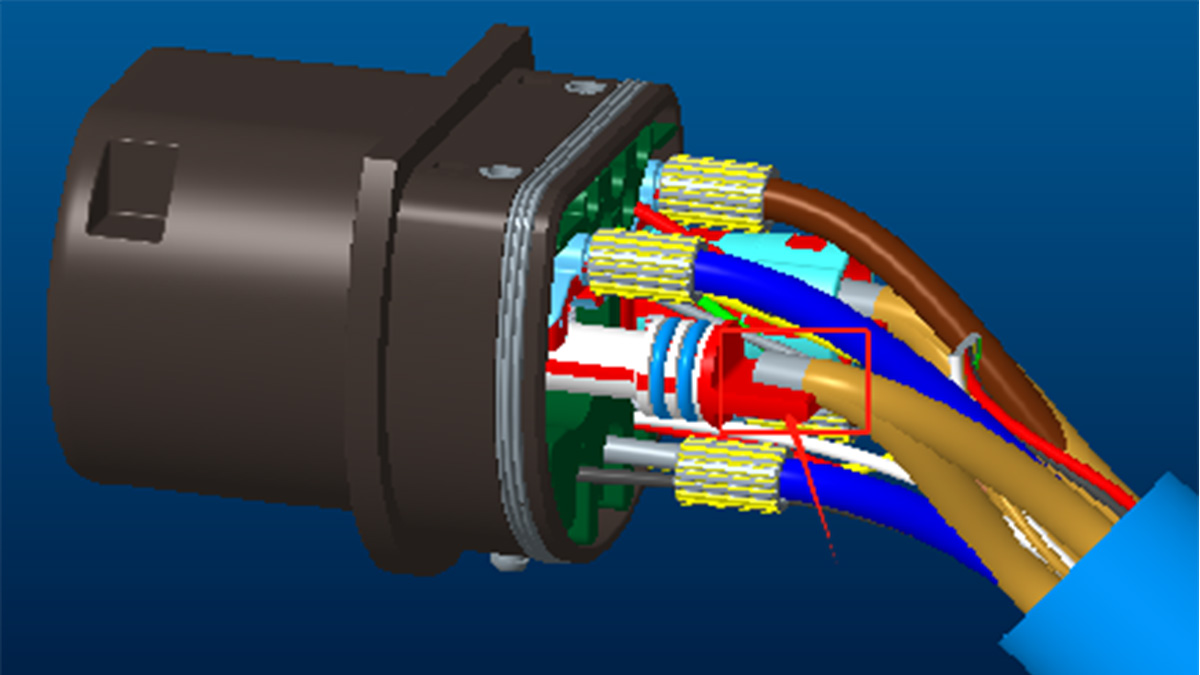
    As electric vehicles (EVs) continue to grow in popularity, charging safety has become a critical concern for drivers, manufacturers, and infrastructure providers. At Workersbee, safety is not just a feature — it's a design priority. That's why every Workersbee connector, including CCS2, CCS1, GBT AC and DC, and NACS AC and DC models, is equipped with a temperature sensor.   We’ll walk you through how these temperature sensors work, why they matter, and how Workersbee uses them to create a safer and more reliable charging experience.     Which Workersbee Connectors Are Equipped with Temperature Sensors?   Workersbee integrates temperature sensors into all major EV connector types we produce, including:   CCS2 connectors (widely used in Europe)   CCS1 connectors (standard in North America)   GBT AC connectors (for Chinese alternating current charging)   GBT DC connectors (for Chinese fast DC charging)   NACS AC connectors (supporting Tesla's North American Charging Standard)   NACS DC connectors (for high-power DC fast charging under NACS)   No matter the standard or the application, the same principle applies — temperature management plays a key role in ensuring safe, stable charging sessions.     What Is a Temperature Sensor in EV Connectors? A temperature sensor is a small but vital component embedded into the connector. Its role is simple: it continuously monitors the temperature at critical points of the connection.   Technically, temperature sensors used in EV connectors are thermistors — special types of resistors whose resistance changes with temperature. Based on how the resistance responds to temperature shifts, there are two main types:   Positive Temperature Coefficient (PTC) Sensors: The resistance increases as the temperature rises. Example: PT1000 sensor (1,000 ohms at 0°C).   Negative Temperature Coefficient (NTC) Sensors: The resistance decreases as the temperature rises. Example: NTC10K sensor (10,000 ohms at 25°C).   By monitoring the resistance in real time, the system can accurately estimate the temperature at the connector head, exactly where the current flows and heat builds up most.       How Does the Temperature Sensor Work? The principle behind temperature sensors in EV connectors is both clever and straightforward.   Imagine a simple road:   If the road gets crowded (high resistance), traffic slows (temperature detected as rising).   If the road clears up (low resistance), traffic flows freely (temperature detected as cooling).   The charger continuously checks this "traffic" by reading the sensor's resistance. Based on these readings:   When everything is within a safe temperature range, charging proceeds normally.   If the temperature begins to rise toward a critical threshold, the system automatically reduces the output current to limit further heating.   If the temperature crosses a maximum safety limit, the charging session is stopped immediately to prevent damage to the vehicle, the charger, or any connected equipment.   This automatic reaction happens within seconds, ensuring a fast, protective response without needing human intervention.       Why Monitoring Temperature Matters During EV Charging Modern EV charging involves transferring a lot of electricity, especially with fast chargers that can deliver 150 kW, 250 kW, or even higher. Where there's high current, there's naturally heat. If heat isn't controlled, it can lead to:   Connector deformation: High temperatures can weaken materials inside the plug, leading to poor electrical contact.   Risk of fire: Electrical fires, although rare, often start with overheated connectors.   Vehicle battery damage: Thermal runaway events in batteries are often triggered by external heat sources.   Downtime and repair costs: Damaged connectors can take chargers offline, impacting network reliability.   By proactively monitoring and reacting to temperature changes, Workersbee’s connectors help prevent these risks before they escalate.       How Workersbee Uses Temperature Sensors for Safer Charging At Workersbee, temperature sensing isn't just an added feature — it's integrated into the design from the ground up.   Here’s how we build safety into every connector:   Strategic Sensor Placement Sensors are installed close to the most heat-sensitive parts of the connector — typically the power contacts and critical wiring junctions — for the most accurate readings.   Dual-Level Protection   First Level: If temperature exceeds a warning threshold, the system dynamically reduces the current.   Second Level: If the temperature reaches the critical cut-off point, charging is stopped immediately.   Fast Response Algorithms Our connectors work with intelligent controllers that process sensor data in real-time. This allows the charger or vehicle to react within milliseconds, preventing unsafe conditions.     Compliance with Global Standards Workersbee connectors are designed to comply with major safety and performance standards, such as IEC 62196, SAE J1772, and Chinese national standards. These regulations often require connectors to have functional temperature protection as part of certification.   Testing for Extreme Conditions Every connector undergoes rigorous thermal cycling and stress testing, ensuring stable performance from freezing winters to hot desert environments.   By combining smart sensor technology with intelligent system design, Workersbee delivers a safer, more resilient charging experience — whether it’s a home charger, a city station, or a highway fast-charging hub.   Real-World Example: Fast Charging in Summer Think about a busy highway charging station in midsummer. Multiple cars are queuing, chargers are working at full power, and ambient temperatures are already high. Without temperature monitoring, a connector could easily overheat under heavy use. With Workersbee’s temperature sensors:   The connector continuously checks its temperature.   If it senses climbing heat levels, it automatically manages the power flow.   If needed, it gracefully reduces charging speed or pauses the session to prevent any harm — no guesswork, no surprises.   For drivers, this means greater peace of mind. For operators, it means fewer maintenance issues and better station uptime.   In the evolving world of electric mobility, charging safety has become more than just a technical requirement — it’s a basic expectation from every EV owner and charging operator.   Workersbee’s approach to connector design shows that safety doesn’t have to come at the cost of performance. By embedding temperature sensors directly into every CCS2, CCS1, GBT, and NACS connector, we ensure that each charging session is closely monitored, responsive to real-world conditions, and protected against unexpected risks.   As charging speeds continue to climb and vehicles demand faster turnaround times, the role of smart thermal management will only become more critical. At Workersbee, we are committed to refining this technology even further because safer charging is not just a goal, it’s the foundation for building a better, more reliable electric future.
    Read More
  • How to Select a Durable DC Charging Connector for Harsh Outdoor Conditions How to Select a Durable DC Charging Connector for Harsh Outdoor Conditions

    Apr 15, 2025
    When you install a DC charging system in an outdoor or industrial setting, the connector often becomes the most exposed part of the entire setup. It's regularly handled, subjected to temperature changes, moisture, dust, and sometimes even physical impact. Choosing a connector that can endure these conditions without compromising performance is not just good engineering—it's essential for safety and long-term reliability.     Understanding the Environment First Before getting into technical specifications, take a step back and look at where the connector will be used. Charging stations near coastlines, logistics depots, construction zones, or areas with extreme temperature shifts all pose different challenges. Understanding the environment will help determine the type of protection needed. Application Environment Key Challenges What to Look For Coastal Areas Salt mist, humidity Salt spray resistance (48h+), corrosion-proof contacts Industrial Zones Dust, oil, vibration IP65/IP67 rating, anti-vibration features Cold Regions Freezing, condensation Material stability at -40°C, sealing against moisture High Traffic Chargers Frequent use, wear 30,000+ mating cycles, wear-resistant materials       Key Performance Features to Consider Durability & Lifespan A connector in a high-use environment should withstand thousands of plug-ins without loss of contact pressure or wear to the housing. Look for validated durability tests with real-life simulation.   Ingress Protection (IP) Rating A good outdoor connector should have at least an IP55 rating. If it's directly exposed to water jets or temporary submersion, consider IP67 or IP69K.   Temperature Performance The connector must handle ambient extremes, but more importantly, it must manage internal heat during charging. Materials and contacts should remain stable from -40°C to +85°C, and heat dissipation should be effective.   Vibration and Shock Resistance In mobile or industrial applications, connectors are subject to vibration. Choosing a design tested under standards like USCAR-2 or LV214 helps ensure stable long-term contact.   Salt Spray and Corrosion Resistance Especially relevant for marine environments or winter road conditions. Connectors with over 48 hours of salt spray testing and corrosion-resistant plating last longer in the field.   Ease of Handling While performance matters, so does the human factor. Ergonomic grip design, easy latching mechanisms, and clearly visible status indicators help ensure safe use in any condition.     Proven Reliability: Workersbee DC Connector Solutions Workersbee has developed a suite of DC charging connectors engineered specifically for harsh outdoor and industrial applications. Among them, the Workersbee DC 2.0 connector is designed and tested to meet the most demanding environmental requirements. What sets our product apart is not just lab-tested performance, but integration of structural innovations tailored for real-world durability.   Key performance and structural highlights from Workersbee’s engineering validation: Double-layer sealing system: An independent sealing structure between the power terminals and signal terminals significantly enhances waterproof reliability. This design minimizes the risk of internal condensation and corrosion, even in high humidity conditions.   Optimized liquid cooling system: The integrated cooling loop features a 5mm inner diameter flow channel to balance flow resistance and thermal conductivity. This ensures consistent heat dissipation even under high-current operation.   Flexible cable assembly: Workersbee’s design supports multiple cable size configurations, including large-diameter cables suited for high power delivery. A specially designed clamping mechanism ensures reliable strain relief even under frequent bending and flexing.   Advanced contact material: Contacts are treated with corrosion-resistant silver alloy and undergo extensive salt spray testing for over 48 hours according to ISO 9227 standards.   Thermal and vibration testing: The connectors have passed thermal cycling between -40°C to +85°C, and vibration testing in compliance with automotive-grade standards (LV214/USCAR-2).     These features are not only theoretical—each connector undergoes a complete production line inspection, including: 100% mechanical locking force test High-voltage insulation withstand test Visual inspection of sealing     Built for Real-World Conditions A harsh environment doesn’t have to mean frequent connector failures or safety compromises. With the right materials, structural design, and test validation, it's possible to build connectors that stand up to both nature and daily use.   At Workersbee, we’ve taken the time to understand what these environments demand—then engineered our connectors to meet and exceed those expectations. If your charging infrastructure is going to be used outdoors, on the road, or in challenging industrial settings, choosing a proven, well-tested solution like the Workersbee DC 2.0 can make all the difference.   For technical specifications, samples, or integration support, feel free to reach out to our team.    
    Read More
  • 375A Naturally-Cooled CCS2 EV Charging Cable for Public DC Fast-Charging | Workersbee 375A Naturally-Cooled CCS2 EV Charging Cable for Public DC Fast-Charging | Workersbee
    Apr 10, 2025
    summary– Continuous 375–400 A delivery without a liquid loop, validated by third-party thermal tests using a 50 K temperature-rise limit – Short-duration headroom to 450–500 A under controlled duty cycles and ambient conditions – Lower system complexity and maintenance versus liquid-cooled assemblies, ideal for highways, urban hubs, and fleet depots     IntroductionHigh current is easy to claim and hard to sustain. For operators, the real question is whether a cable can hold its temperature within a predictable window long enough to serve the typical session mix at your site.   Workersbee’s naturally-cooled CCS2 cable targets the 375–400 A band for day-to-day operation and provides short bursts to 450–500 A, depending on ambient temperature and duty cycle. The result is strong throughput without the pumps, hoses, coolant, or extra service tasks that come with active cooling.     Quick specifications(The table collates what buyers ask first so they can qualify the solution in minutes.) Parameter Value / Notes Interface CCS2 (IEC 62196-3 configuration) Continuous current class 375–400 A, verified against a 50 K conductor/terminal ΔT criterion Short-duration overload Up to 450–500 A for limited intervals under defined duty cycles Conductor layout Multi-core copper, example build 4 × 60 mm² for DC paths plus control cores Thermal control Passive (no liquid loop, no fans) Typical use cases Motorways and urban fast chargers, fleet depots, mixed-use public hubs Operating temperature Site-dependent; derating guidance provided below Ingress protection Determined by the mated gun and inlet assembly; follow handle/inlet datasheets Compliance intent Designed to meet applicable IEC requirements; third-party test summary available     Independent thermal testing at a glanceA third-party laboratory performed stepped-current runs at warm-weather ambients (roughly high-20s to low-30s °C). The pass/fail yardstick was a temperature-rise limit of 50 K at the critical points. The cable held within the limit throughout the 375–400 A band and offered controlled, short-duration operation at 450–500 A.   In practice, this means a naturally-cooled build can complete most real-world sessions in the target current range without an active loop. For procurement traceability, publish the lab name, report ID, and test date alongside a downloadable summary on the page.   What the results mean for operators– Throughput: Fewer thermal throttles in typical warm conditions at 375–400 A, so queues shorten and sessions complete more predictably. – Simplicity: No pumps, fans, sensors for a liquid loop, or coolant top-ups, reducing points of failure and truck rolls. – TCO: Lower capex and service line items versus liquid-cooled assemblies in this current class.   Where a naturally-cooled cable fits best– Highways with steady 15–25-minute sessions from mid-SOC– Urban sites with moderate dwell and high turnover– Fleet depots with planned charging windows and known duty cycles   When to prefer liquid-cooled– Ultra-high currents sustained for long windows in hot climates– Design envelopes that require very small cross-sections and tight bend radii at extreme power levels     Derating and duty-cycle guidanceThermal headroom shifts with ambient temperature, airflow around the cable and gun, and session profile. As a simple rule of thumb for engineering reviews: above 35–40 °C ambient, plan for shorter high-current plateaus or for slightly lower setpoints to keep ΔT within the 50 K limit. For fleets, simulate a day’s duty cycle and check that cumulative heat from back-to-back sessions still leaves recovery time.     Naturally-cooled vs liquid-cooled vs forced-air(Use this as a quick scoping aid during RFPs and site design.)   Aspect Naturally-cooled cable Liquid-cooled cable Forced-air assisted Continuous current window 375–400 A typical 500 A and above sustained 300–400 A typical System complexity Low; no loop components High; pumps, hoses, coolant, seals Medium; fans, ducts, filters Service items Visual checks, torque/strain relief, sleeve wear Coolant checks, pump life, leak tests Fan/filter replacement, noise checks Failure modes Mechanical wear only Leaks, pump failure, connector fouling Fan failure, dust ingress Ambient sensitivity Moderate Lower for same current Moderate to high Noise Silent Silent Audible Best fit High-volume public/fleet in warm to hot climates Ultra-fast lanes, extreme duty sites Budget upgrades and retrofits     Applicable standards and referencesThis cable family is engineered with the following frameworks in mind. Use precise editions as required by your market and certifier.– IEC 62196-3 for DC vehicle couplers (CCS2 configuration)– IEC 61851-23 and -24 for DC EVSE and communication– IEC 62893 series for EV cable assemblies– IEC 60529 for ingress protection ratings as declared on the mated gun/inlet– Local conformity regimes such as CE, UKCA, or national marks where applicable     Installation and maintenance checklist– Match the cable cross-section and gun to the cabinet’s rated current and duty cycle– Respect minimum bend radius and strain-relief instructions during routing– Keep sleeves and seals clean; remove conductive dusts and road grime– Inspect terminals periodically for torque and discoloration– In hot seasons, verify that charging profiles still sit inside the intended temperature-rise window     Frequently asked questions Q. What does the 50 K temperature-rise limit representA. It is a commonly used thermal criterion in cable and connector evaluation. The assembly is exercised at current while the temperature increase at defined points must stay within 50 K above ambient.   Q. Can a naturally-cooled cable hold 400 A in very hot weatherA. Yes in many cases, as shown by third-party tests. At higher ambients, duty cycle and airflow matter. Operators can trim current slightly or reduce plateau duration to preserve margin.   Q. Is a temperature sensor requiredA. A naturally-cooled cable does not use a liquid loop or fan control. Basic safety monitoring on the handle and terminals remains part of good design practice and should be kept.   Q. How do I choose a matching inlet/socketA. Pair the gun and inlet for the same current class and conductor cross-section. For the tests referenced here, the assembly was matched to a heavy-gauge socket; your selection should follow the site’s rated current and connector spec.   Q. When should I move to liquid-cooledA. If your site needs long, repeated high-current plateaus above this cable’s continuous band in hot climates, or if space constraints dictate smaller cross-sections at very high power.     Contact us for: Get the datasheet Request the third-party thermal test summary Talk to an engineer about duty-cycle sizing Discounted samples for testing
    Read More
  • Workersbee Dura Charger: The Ultimate Portable & Multifunctional EV Charging Solution Workersbee Dura Charger: The Ultimate Portable & Multifunctional EV Charging Solution
    Apr 01, 2025
    The electric vehicle (EV) revolution is accelerating, and with it comes the need for smarter, more versatile charging solutions. Workersbee’s Dura Charger is a portable, multifunctional AC charger designed for EV owners who demand flexibility, reliability, and cutting-edge technology. Whether you're a frequent traveler, an off-grid adventurer, or a business managing an EV fleet, the Dura Charger redefines convenience with its 22kW fast charging, V2L/V2V discharging, and universal plug compatibility.     In this in-depth review, we’ll explore why the Dura Charger stands out in the competitive EV charging infrastructure market, its key features, and how it can enhance your charging experience.       Why Choose the Workersbee Dura Charger     1. Dura Charger Charging Solution: Single-Phase And Three-Phase Intelligent Switching   The Dura Charger supports both single-phase (230V) and three-phase (400V) charging, making it one of the most adaptable portable EV chargers on the market.     Single-phase mode (7.4kW max) – Ideal for home charging where three-phase power isn’t available.   Three-phase mode (22kW max) – Delivers ultra-fast charging at public stations or commercial sites.     This flexibility ensures compatibility with nearly all EV charging stations worldwide, eliminating the need for multiple chargers.       2. Global Plug Compatibility: 30+ Adapter Options   One of the biggest challenges for EV drivers is finding the right plug type when traveling. The Dura Charger solves this with over 30 interchangeable adapters, including:     Type 2 (Mennekes) – Standard in Europe for AC charging.   Schuko (CEE 7/7) – Common in households across the EU.   Type G (UK Plug) – Fully compliant with British charging standards.   CEE Industrial Plugs (16A/32A, 230V/400V) – For high-power charging at campsites or workshops.     Each adapter features automatic current detection, ensuring safe charging without manual adjustments.       3. Vehicle-to-Load (V2L) & Vehicle-to-Vehicle (V2V) Discharging   The Dura Charger isn’t just for charging—it also discharges power from your EV battery, unlocking two game-changing functions:     V2L (Vehicle-to-Load) – Power home appliances (up to 3.68kW) during blackouts or outdoor trips.   V2V (Vehicle-to-Vehicle) – Rescue another EV by transferring energy via a Type 2 cable.     This makes the Dura Charger an essential tool for emergencies, camping, and off-grid living.       4. Smart Load Balancing & Energy Management   To prevent electrical overloads, the Dura Charger integrates dynamic load balancing, which:     Adjusts charging power based on household energy consumption.   Syncs with EVbee Energy Manager (optional) for optimized energy distribution.   Supports OCPP 1.6 for commercial fleet management.     This feature is perfect for businesses running multiple EV charging stations or homeowners with limited grid capacity.       5. Rugged & Weatherproof Design (IP67 & IK10 Rated)   Built for durability, the Dura Charger features:     IP67 waterproofing – Resists rain, dust, and extreme temperatures (-25°C to +50°C).   IK10 impact resistance – Survives 3,000kg wheel loads, making it ideal for construction sites or outdoor use.   Nylon-rubber alloy casing – Protects against drops, UV exposure, and corrosion.     Whether wall-mounted or carried in a car trunk, this charger is built to last.       Advanced Features for a Seamless Charging Experience       6. WiFi & Bluetooth Connectivity for Remote Control   Manage charging sessions effortlessly via the EVbee Home App, which allows:     Real-time monitoring (voltage, current, charging speed).   Scheduled charging (to utilize off-peak electricity rates).   Remote start/stop via smartphone.     Bluetooth ensures connectivity even without WiFi, making it ideal for remote locations.       7. Ultra-Fast 22kW Charging for On-The-Go Power   Unlike standard portable EV chargers limited to 7.4kW, the Dura Charger delivers up to 22kW when connected to a three-phase power source.     3x faster charging compared to typical Level 2 chargers.   Compatible with Tesla, Audi e-tron, Porsche Taycan, and other high-capacity EVs.   HD LCD screen displays live charging data for full transparency.       8. Comprehensive Safety Protections   Safety is non-negotiable in EV charging infrastructure, and the Dura Charger includes:     Overvoltage/undervoltage protection (165V–265V range).   DC 6mA residual current detection (exceeds IEC 62955 standards).   Short-circuit, surge, and overheating safeguards.   CE, UKCA, TUV, RoHS certifications for global compliance.       9. Plug-and-Charge Simplicity with Auto-Start Mode   For hassle-free charging:     Auto-start mode – Plug in, and charging begins instantly.   App-controlled mode – Ideal for shared or paid charging stations.   LED indicators – Clear status updates (green = charging, red = fault).       10. Long-Term Support & Warranty   Workersbee stands behind the Dura Charger with:     10+ years of conditional service support (firmware updates, troubleshooting).   Global technical assistance via EVbee’s service network.   Warranty coverage (varies by region; check local terms).         Who Should Use the Dura Charger?     ✔ Frequent Travelers   Universal adapters ensure charging anywhere.   Compact and portable (only 3.5kg).     ✔ Off-Grid & Outdoor Enthusiasts   V2L powers appliances during camping or emergencies.   Rugged design withstands harsh environments.     ✔ Businesses & Fleet Managers   OCPP 1.6 compatibility for smart energy management.   Load balancing prevents grid overloads in multi-charger setups.     ✔ Homeowners with Limited Electrical Capacity   Adjustable current settings (6A–32A) prevent circuit tripping.   Scheduled charging reduces electricity costs.         The Future of Portable EV Charging   The Workersbee Dura Charger is more than just a portable EV charger—it’s a complete charging ecosystem that adapts to your lifestyle. With 22kW fast charging, V2L/V2V discharging, global plug compatibility, and military-grade durability, it’s the ultimate solution for modern EV drivers.     Whether you need a reliable home charger, a travel companion, or a business-grade EVSE station, the Dura Charger delivers unmatched performance.
    Read More
  • Why Liquid Cooling Is the Future of High-Power EV Chargers (2025 Guide) Why Liquid Cooling Is the Future of High-Power EV Chargers (2025 Guide)
    Mar 21, 2025
    So, you’re diving into the world of high-power EV charging, and you keep hearing about liquid-cooled chargers. But what’s the big deal? Why are top EV charging manufacturers shifting toward this technology? And most importantly—how does it benefit you?   Buckle up, because in this guide, we’re breaking down why liquid cooling is the future of high-power EV chargers in 2025 and beyond. Whether you’re a business investing in charging infrastructure or an EV enthusiast looking for faster, more reliable charging, you’ll want to read this.   The Problem with Traditional Air-Cooled Chargers Before we jump into liquid cooling, let’s talk about the elephant in the room—why air cooling isn’t cutting it anymore for ultra-fast charging.   Overheating Issues – High-power chargers (350kW+) generate intense heat. Air-cooled systems struggle to dissipate it efficiently, leading to overheating risks. Limited Power Output – Heat buildup forces air-cooled chargers to throttle power, meaning slower charging speeds when you need them most. Bulky & Noisy – Air-cooled systems require large heat sinks and fans, making them bulkier, louder, and less efficient.   Now, let’s talk about the game-changer: liquid cooling.   What Is Liquid Cooling & How Does It Work? Liquid cooling in EV chargers works just like the cooling system in your car’s engine—except it’s cooling electrical components instead of a combustion engine. Here’s how it works: ✅ A special coolant (dielectric liquid) flows through the charger’s internal components. ✅ The liquid absorbs heat from power electronics and cables. ✅ A heat exchanger or radiator transfers the heat away, keeping the system cool. ✅ The cooled liquid circulates back, maintaining a stable temperature even under extreme power loads. Sounds high-tech? It is. But it’s also the reason why the EV industry is embracing liquid cooling at record speed.   5 Reasons Why Liquid Cooling Is the Future of EV Charging   1. Enables Ultra-Fast Charging (500kW & Beyond) Want to charge your EV in 10-15 minutes? Liquid cooling makes it possible. High-power chargers (like 350kW, 500kW, and beyond) generate massive amounts of heat. Without proper cooling, they can’t sustain maximum power for long periods—which means slower charging times.   Liquid-cooled chargers keep temperatures low, allowing for continuous, full-speed charging without throttling. This is essential as EV batteries get larger and demand faster charging solutions.   Example: The latest CCS2 liquid-cooled DC fast chargers can deliver up to 500kW of power, cutting charging times by nearly 50% compared to air-cooled systems.     2. Compact, Lightweight, & More Efficient One major downside of air cooling? Size and weight. Traditional air-cooled chargers require massive heat sinks and fans, making them:❌ Bulky (taking up more space)❌ Heavier (harder to install)❌ Less efficient (losing energy in heat dissipation) Liquid-cooled systems, on the other hand, use compact radiators and thin cooling tubes, significantly reducing size and weight.   The result? · Slimmer, more modular chargers · Easier installation & maintenance · Higher efficiency with minimal energy loss   Example: Many new ultra-fast DC chargers, like those used in Tesla’s Supercharger V4 stations, have switched to liquid-cooled cables, making them 40% lighter and more flexible than traditional air-cooled ones.     3. Increases Charger Lifespan & Reliability Overheating isn’t just bad for charging speeds—it’s one of the biggest factors leading to charger failure.   Extreme temperatures degrade internal components over time, leading to:❌ Frequent breakdowns❌ Higher maintenance costs❌ Shorter product lifespan   Liquid cooling prevents thermal stress, keeping components at optimal operating temperatures even during peak usage. This extends the lifespan of EV chargers, reducing the need for costly replacements.   Bonus: Liquid-cooled chargers require less maintenance than air-cooled systems because they don’t rely on moving fans and large venting systems that accumulate dust and debris.     4. Future-Proofs Charging Stations EV battery technology is advancing rapidly, with 800V and even 1000V battery systems becoming the new standard.   Older air-cooled chargers struggle to keep up with these higher voltage and power demands. Liquid cooling future-proofs your charging infrastructure, ensuring compatibility with next-gen EVs.   Example: Many next-generation EVs—like the Porsche Taycan, Hyundai Ioniq 6, and Lucid Air—support 800V ultra-fast charging. Liquid cooling ensures chargers can handle these higher voltages without overheating.     5. Supports Heavy-Duty EVs (Trucks, Buses, Fleets) The EV revolution isn’t just about cars—it’s also transforming commercial vehicles. Fleet operators, public transit, and logistics companies are rapidly electrifying their vehicles, but heavy-duty EVs require significantly more power than passenger cars. Electric trucks & buses need ultra-fast, high-power charging.Air cooling simply isn’t enough to sustain these power levels.   Liquid-cooled chargers enable megawatt-level charging, making EV adoption more practical for commercial fleets.   Example: The new Megawatt Charging System (MCS), designed for electric semi-trucks like the Tesla Semi and Freightliner eCascadia, uses liquid cooling to safely deliver 1MW+ of power.     Are Liquid-Cooled Chargers More Expensive? Let’s address the obvious question: Is liquid cooling more expensive? Yes, liquid-cooled chargers have a higher upfront cost, but they also:✔ Charge faster (higher efficiency = lower electricity costs)✔ Last longer (fewer replacements & maintenance calls)✔ Support next-gen EVs (future-proof investment)   For businesses, the ROI (return on investment) is clear—faster turnaround, lower maintenance, and increased revenue from high-power charging.     Final Thoughts: Liquid Cooling Is Here to Stay If you’re serious about high-power EV charging, liquid cooling isn’t optional—it’s the future. ✅ Faster charging speeds without throttling✅ More compact & energy-efficient designs✅ Longer lifespan & lower maintenance✅ Essential for next-gen EVs & heavy-duty vehicles   At Workersbee, we specialize in cutting-edge liquid-cooled CCS2 DC fast chargers, ensuring the best performance, efficiency, and reliability for businesses and charging networks.   Ready to future-proof your EV charging infrastructure? Let’s talk. Explore Our Liquid-Cooled Charging Solutions
    Read More
  • Do EV Chargers Really Need an LCD Screen? Do EV Chargers Really Need an LCD Screen?
    Mar 06, 2025
    Introduction: Do You Really Need an LCD Screen on Your EV Charger?     When buying an EV charger, most people focus on factors like charging speed, convenience, and compatibility. However, one feature that's often overlooked is the LCD screen. Many chargers come with sleek digital displays that show real-time charging data, while others go for a minimalist, screen-free design.     Lately, more and more EV owners are opting for chargers without LCD screens—but why? Are screen-free chargers a smart choice, or are you missing out on important features? In this article, we'll dive deep into the advantages and potential drawbacks of EV chargers without LCD screens to help you make an informed decision.         Why Are Some EV Chargers Designed Without an LCD Screen?     LCD screens might seem like a useful feature, but they aren't always necessary. In fact, many EV owners find that a screen-free charger offers a more practical and reliable experience. Here's why manufacturers are moving toward simpler designs:     - Minimalist Approach – Many users prefer a straightforward charging process without extra buttons or screens.   - Cost Reduction – Removing an LCD screen makes chargers more affordable.   - Enhanced Durability – Fewer electronic components mean fewer chances of damage or malfunction.   - Alternative Display Options – Most modern EVs provide real-time charging data on their dashboards or mobile apps, reducing the need for a charger-based display.     Now, let's break down the specific benefits of using an EV charger without an LCD screen.       Top Benefits of an EV Charger Without an LCD Screen     1. Simplicity and Ease of Use     One of the biggest reasons people choose an EV charger without an LCD screen is the ease of use. If you don't need to monitor every detail of the charging process, why complicate things?     A screen-free charger keeps the process simple:   ✅ Plug in your EV   ✅ Charging starts automatically   ✅ Walk away and go about your day     Many EV owners don't feel the need to constantly check their charging status, especially when they can get all the necessary information from their car's dashboard or a mobile app.     For those who prioritize convenience over tech-heavy features, a charger without an LCD screen is a no-fuss solution that gets the job done.       2. More Affordable Price Tag     Another major advantage is cost savings. EV chargers with LCD screens tend to be more expensive because they include additional display technology and user interface components. If you're looking for an affordable yet effective charger, skipping the LCD screen can reduce the upfront cost without compromising core functionality.     Cost Breakdown:   - Chargers with LCD screens → Higher price due to added components   - Chargers without screens → More budget-friendly, focusing purely on performance     Beyond the initial purchase price, maintenance costs also tend to be lower. Screens can break, malfunction, or become unreadable over time, especially if exposed to extreme weather conditions. By choosing a charger without an LCD, you eliminate one more thing that could go wrong, leading to long-term savings.       3. Enhanced Durability and Longevity     If you plan to install your EV charger outdoors, durability is a key consideration. LCD screens are delicate and can be affected by:   ❌ Extreme heat or cold   ❌ Direct sunlight exposure   ❌ Moisture, rain, or snow   ❌ Accidental impacts     On the other hand, a screen-free charger is more rugged and weather-resistant, making it a better choice for outdoor installations. With fewer fragile components, it's built to last longer, requiring less maintenance and fewer repairs over time.     This makes it ideal for:   - Outdoor home installations (driveways, garages, parking areas)   - Commercial charging stations (where chargers are exposed to heavy use and rough weather conditions)       4. Fewer Technical Issues     EV chargers with LCD screens rely on complex electronics that can sometimes malfunction. Issues like frozen displays, touchscreen failures, or display errors can be frustrating, especially if you just want to charge your vehicle.     A screen-free charger eliminates these potential problems. With fewer electronic components, these chargers tend to be:   ✅ More reliable   ✅ Less prone to technical issues   ✅ Easier to maintain     This simplicity translates to a hassle-free user experience, especially for those who prefer a plug-and-play solution.       Are There Any Drawbacks to Not Having an LCD Screen?     While there are plenty of advantages to screen-free chargers, it's important to consider some potential downsides as well.     1. No Built-in Charging Status Display   Without an LCD screen, you won't see:   - Real-time charging status   - Charging speed (kW output)   - Estimated time to full charge     However, most EVs display this information directly on the vehicle's dashboard or through a mobile app. If your car already provides detailed charging updates, an LCD screen on the charger might be redundant.     2. No Advanced On-Screen Controls   Some high-end EV chargers with LCD screens offer:   - Custom charging settings (e.g., setting a scheduled charge time)   - Detailed energy tracking   - Software updates via the screen interface     If these features are important to you, a screen-equipped charger might be the better option. However, many modern chargers without LCD screens still allow users to control settings via a smartphone app, offering similar functionality without the need for a built-in display.       So, Is a Screen-Free EV Charger Right for You?     Now that we've explored the pros and cons, let's summarize who benefits most from an EV charger without an LCD screen:     A screen-free charger is perfect for you if:   ✔️ You prefer a simple, plug-and-go charging experience   ✔️ You want a budget-friendly charger without extra costs   ✔️ You need a durable and weather-resistant charger for outdoor use   ✔️ You rely on your EV's dashboard or app for charging updates     A charger with an LCD screen might be better if:   ✔️ You want detailed real-time charging updates directly on the charger   ✔️ You like having custom settings and advanced features   ✔️ You don't mind paying extra for an enhanced user interface       Conclusion: Which EV Charger Should You Choose?     At the end of the day, the best EV charger is the one that fits your needs and lifestyle. While LCD-equipped chargers offer extra features, screen-free chargers are gaining popularity due to their simplicity, affordability, and durability.     If you're looking for a reliable EV charger that's easy to use and built to last, Workersbee has you covered! We offer a range of high-quality EV chargers, from simple, cost-effective models to feature-packed options.     Ready to find the perfect charger for your EV? Contact Workersbee today!
    Read More
  • Practical Guide to EV Extension Cable Adapters in 2025: Solving Distance and Compatibility Issues Practical Guide to EV Extension Cable Adapters in 2025: Solving Distance and Compatibility Issues
    Feb 25, 2025
    Why EV Extension Cable Adapters Matter More Than Ever As electric vehicles become more common on roads worldwide, the need for flexible and reliable charging solutions is growing. One recurring issue among EV users is the mismatch between charger cable length and the vehicle's parking location. Another is the variation in connector types between regions and charger models. EV extension cable adapters offer a straightforward solution to both problems.   In this guide, we'll explore how these adapters help overcome real-world charging challenges, how to choose the right one, and why they are essential for EV owners, fleet operators, and charging infrastructure providers.     Issue Real-World Scenario Solution Limited cable reach Public charger is too far from the EV inlet Use a compatible extension cable Incompatible connectors Type 1 EV arrives at a Type 2-only charging station Use a Type 1 to Type 2 adapter Shared charging stations Fleet vehicles require standardized charging setups Use adapters to bridge connector differences     1、Understanding the Core Problems: Charging Distance & Connector   Compatibility Key Insight: An EV extension cable adapter acts as a bridge—not just physically, but also in terms of electrical compatibility and charging convenience.     2. Types of EV Extension Cable Adapters and Their Applications   1、Type 1 to Type 2 – For North American vehicles using J1772 connectors to access Type 2 chargers (common in Europe). 2、Type 2 to Type 1 – For European EVs needing to charge from Type 1 stations. 3、Type 2 Extension Cable (Male to Female) – Extends existing Type 2 cable length, useful in home garages or tight public spots. 4、CHAdeMO and CCS Adapters – Often used by fleet operators handling mixed EV types.   Each type varies in amperage capacity, IP rating, cable length, and plug materials.     3. How to Choose the Right EV Extension Adapter   Criteria Recommendation Connector type Confirm your EV inlet and charger outlet types Charging level Level 2 AC charging typically up to 32A; make sure adapter supports the load Cable length 5–10 meters is typical for extension cables Durability Look for IP54 or higher rating for outdoor use Certifications Choose products with CE, TÜV, or UL certifications for safety assurance   Here’s a structured approach to selecting the most appropriate adapter: Pro Tip: Avoid using extension adapters on DC fast chargers unless certified and explicitly allowed by the charger manufacturer.     4. Safety and Performance Considerations   Using a poorly constructed or mismatched adapter can lead to overheating, short circuits, or damage to the vehicle and charger. To ensure optimal safety: Always match voltage and current specifications. Check for internal thermal protection. Inspect connectors regularly for wear and corrosion. Don’t exceed the rated power capacity of the adapter.   According to a report by the European Alternative Fuels Observatory (EAFO), over 18% of EV charging complaints in Europe stem from cable or plug compatibility issues—most of which are avoidable with the right adapter.     5. Where EV Extension Adapters Make the Biggest Difference   Home charging: When driveway layouts limit how close you can park to the wall charger. Workplaces & Apartments: Shared parking spots often require extra reach and compatibility. Public stations: Many EV users report chargers being blocked or poorly located. Fleet depots: Operators managing multiple brands benefit from standardized extension adapters. Case Example: In Berlin, a car-sharing service reduced vehicle downtime by 22% after equipping their fleet with Type 2 extension adapters, solving distance and socket type conflicts at mixed-use charging hubs.     6. Cost vs. Value: Are Adapters Worth It?   Factor Cost Estimate (EUR/USD) Value Addition Type 2 Extension Cable 80–150 Solves distance, improves daily usability Type 1 to Type 2 Adapter 60–100 Enables cross-region charging compatibility Safety-rated accessories Slightly more expensive Protects EV and charger, ensures longevity Compared to the cost of relocating a charger or installing new infrastructure, these adapters are a low-cost investment with high convenience returns.     7、Why You Should Consider Investing in One   As EV adoption continues to rise, ensuring seamless access to charging points—regardless of location or connector type—becomes increasingly important. EV extension cable adapters offer flexibility, convenience, and a practical solution to everyday challenges faced by drivers and operators.   If you're looking to improve your EV charging experience or minimize vehicle downtime in your fleet, investing in high-quality, safety-certified extension adapters is a smart and affordable move.   Explore Our Range Ready to make charging easier? Browse the full range of certified extension adapters at Workersbee
    Read More
1 2 3 4 5 6 7 8 9 10 11
A total of11Pages

Need Help? leave a message

Leave A Message
Submit

home

products

whatsApp

contact